Ryan Ditch is a professional photographer based in Scottsdale, Arizona focused on landscape, wildlife and teaching. “My passion outside of nature is sharing what I've learned over the years and my love of photography with others through workshops,” he says. We came across this stunning long exposure astro image of his and had to learn the story behind the shot. Keep reading below as he shares how he created it using his Alpha 7R IV, 16-35mm f/2.8 G Master, the RMT-P1BT Wireless Remote Commander – and a drone to make the halo of light.
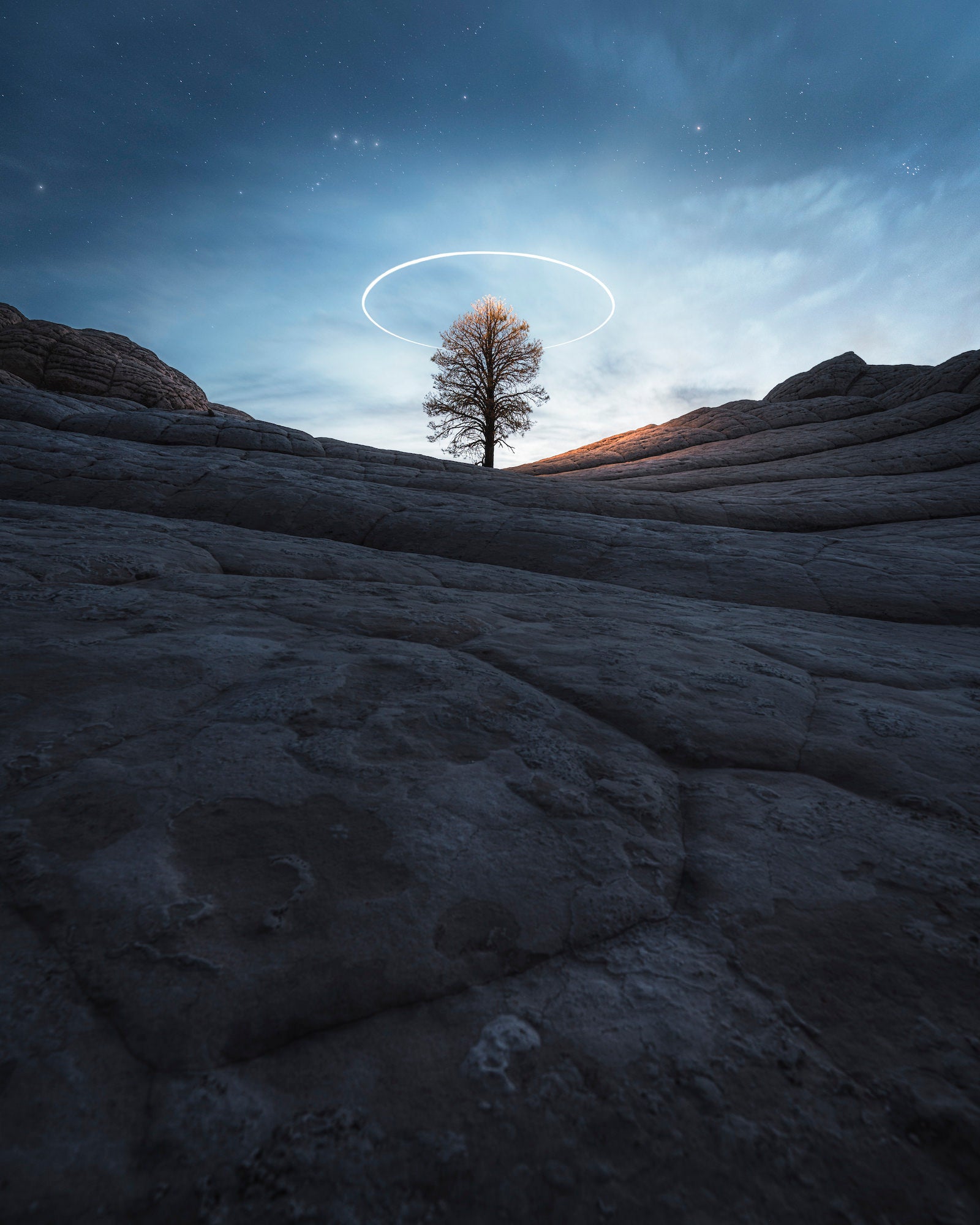
Photo by Ryan Ditch. Alpha 7R IV. 16-35mm f/2.8 G Master.
Lone Tree, Perfect Location
I'd seen some photos of this lone tree in the most unlikely place and knew it was something I had to see for myself. After a bit of research I found an area called White Pocket in Northern Arizona and couldn't believe what I was seeing, not only the tree, but these brainlike formations. Dating back to the Jurassic period these unique textures were likely created by erosion of sediment from earthquakes and or volcanic eruptions.
After finding the location I had an idea that I'd seen several times in other locations of creating a drone light circle above the tree. Using the auxiliary light I knew I'd be able to light up the tree and take a long exposure capturing an ethereal scene unlike anything I'd seen at this location.
The Perfect Place For A Wide-Angle Lens
I shot this on my Alpha 7R IV using my 16-35mm f/2.8 G Master. A wide lens was required for this so I could capture as much foreground as possible to bring the viewer in and up through the image. I didn't use any of the camera's features as I like to do everything manually, but auto exposure and auto focus bracketing does help. The SonRMT-P1BT Wireless Remote Commander is something I always have with me and use when taking shots like this, but it's not required.
Using Focus-Stacking To Create The Image
An image like this takes multiple shots and a bit of understanding of what each shot takes to create a single image. First I took several photos stacking the focus to get sharpness all the way through, next a shot of just the sky exposed correctly to retain highlights, but also get sharp stars. Another shot of the drone lighting up the tree from directly above and lastly, multiple shots to get the perfect drone circle. When I say multiple I mean like 25 or so. Even just the slightest breeze will cause your drone to wobble. To get the drone to do this you simply set a point, select "circle" and then decide how wide you want to be.
A tripod is absolutely necessary for this because you'll be taking long exposures, but also stacking is required in post. As I mentioned, I always use the RMT-P1BT remote, but a cable release works too. Having the least bit of camera shake as possible is ideal. If you don't have a remote, then a five-second delay is best. My camera settings for this were different from shot to shot, but all were shot at 16mm and f/2.8, ISO and shutter speed varied.
The Edit
Editing is something I've poured my entire craft into, creating a look that hopefully identifies my work and helps set me apart. I use Adobe Lightroom Classic and Adobe Photoshop to process my images end-to-end. Lightroom helps dial in my tones and colors using a few presets that I've created over the years. Photoshop allows me to stack images and really refine the edit using brushes, advanced techniques and masking. Keep in mind, the better you capture your photos in-camera the easier editing will be so before you go down a YouTube rabbit hole, make sure to really dial in your knowledge of ISO, shutter speed and aperture and how they work together.
See more of Ryan Ditch’s work on Instagram @ryanditchphoto and at ryanditchphoto.com.
Shop Ryan’s Kit For Astro:
–Alpha 7R IV (Now $900 off!)
–16-35mm f/2.8 G Master
–RMT-P1BT Wireless Remote Commander
Read the stories behind more images taken by your favorite photographers here.