Burak Esenbey (@BurakEsenbey) is a landscape and astrophotographer who frequently travels to places like Namibia, Socotra in Yemen, Argentina, Indonesia and Iceland to photograph the natural world. His images have been honored in many competitions, like in the Royal Museums Greenwich - London: Astronomy Photographer of the Year 2023 Competition – and most recently the image below featured in the Capture The Atlas: The 2025 Milky Way Photographer of the Year. We caught up with him to learn more about how he created the beautiful astro-landscape using his Alpha 7 IV (Buy Now), Alpha 7 III (Buy Now) and the 14mm f/1.8 G Master (Buy Now) – keep reading as he shares his story behind the shot.
Have your own astro-landscape to share? This week's Alpha Female+ Micro-Grant theme is astro-landscape, and you can enter yours for the chance to win $500! Join the Alpha Female Facebook Community and post your photo with a descriptive caption through October 19, 2025 at 11:59 PM PT.
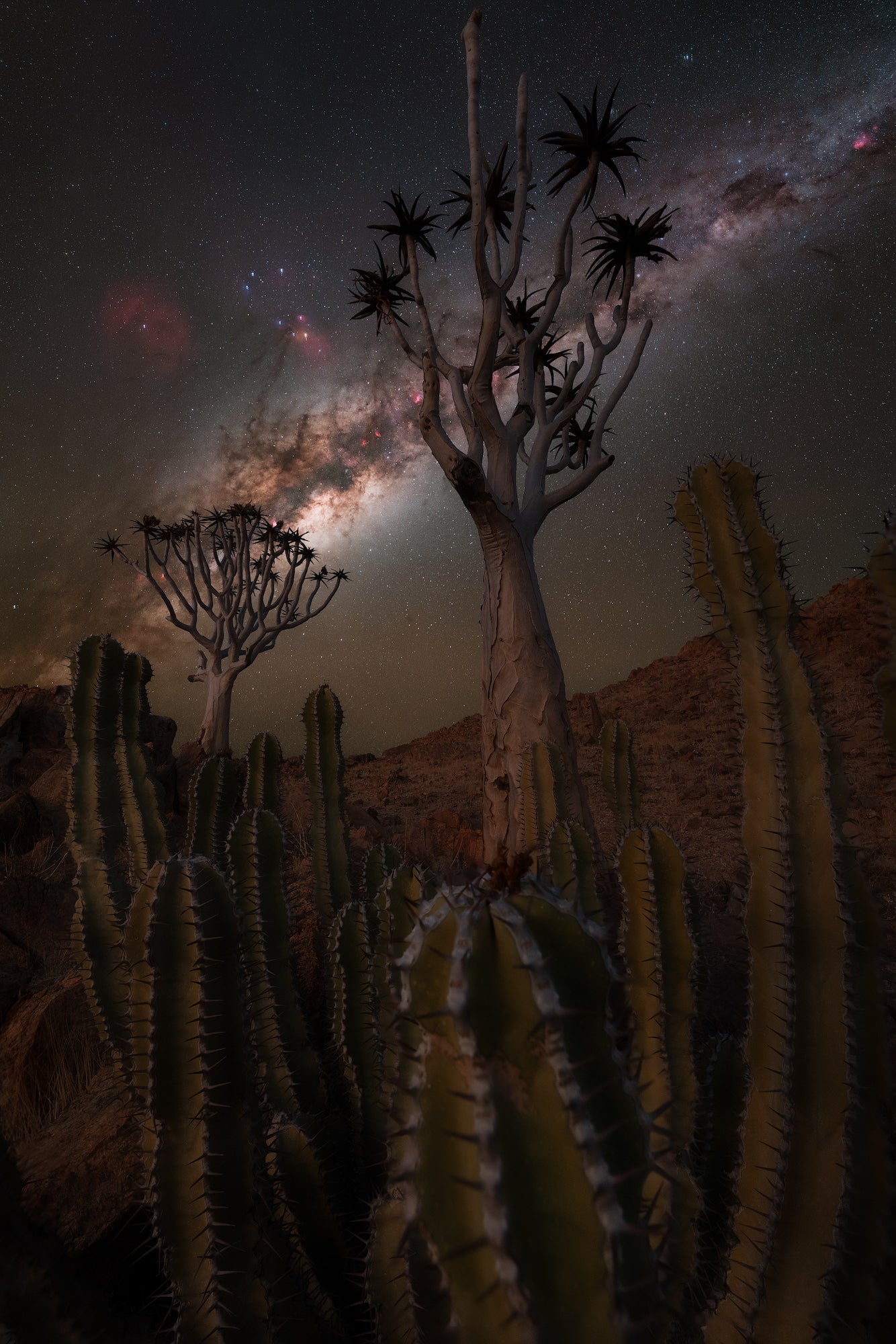
Photo by Burak Esenbey. Alpha 7 IV + Alpha 7 III (astro-modified). 14mm f/1.8 G Master
Finding A Hidden Photographic Oasis
Every year during our Namibia workshop, we aim to push the limits and create the most diverse and compelling photo opportunities for our clients. Our first stop on every tour is the region around Kanaan – a place that offers ideal conditions for night photography. The landscape here is endlessly flat, punctuated by isolated, bare trees and mountains in the horizon, providing a striking foreground for astrophotography.
Last year, however, we decided to explore the area further, and our local guides led us into a kind of small canyon. Nestled between two modest hills, we discovered a hidden photographic oasis filled with cacti and quiver trees – the perfect foreground subjects for a Milky Way composition.
For me personally, it was an especially rewarding experience. I've always felt that cacti combined with the Milky Way create a particularly powerful visual impact. But to be gifted with a perfectly aligned scene featuring both a quiver tree and a cactus positioned just right beneath the Milky Way – that was beyond anything I could have imagined.
The Best Wide-Angle Lens For Astro-Landscapes
For this particular shot, I had my Alpha 7 IV and my astro-modified Alpha 7 III with me, just like on all my photo trips. Along with these, I brought my favorite lens, the 14mm f/1.8 G Master. Additionally, I had my Sunways photo tripod, the T3640, a Hydrogen Alpha Filter and my Star Tracker from MoveShootMove – the Nomad.
Capturing this shot was not exactly easy – it required several stages. The first step was working with the foreground. I felt that by getting really close to the cactus, the effect in the final image would become even more intense. I firmly believe that composition is the most important aspect of any photograph. No matter how good your astrophotography skills are or how sharp the details in the sky may be, it's always the composition that ultimately makes or breaks the shot.
To get close to the subject while still maintaining enough space in the rest of the frame, the 14mm lens was absolutely essential. Only a wide-angle lens offers this option. However, it was crucial to use focus stacking in this case, as there would have been no chance of achieving sharpness across the entire image otherwise. I took eight shots at different focal points in the frame to ensure that every element in the image remained sharp.
The sky also requires different techniques. In general, I track the sky to make longer exposures. For this, I always use my astro-modified camera. Once everything was aligned and set up on the Nomad, I took a 120-sec. exposures of the Milky Way. After that, I captured the same section again using the Hydrogen Alpha filter to capture more detail in the red nebula regions. In total, I ended up with 2 x RGB and 3 x Ha exposures.
- EXIFS for the Foreground: 14mm f/1.8 G Master. 5-sec., f/4.5, ISO 2500 - 8 images
- EXIFS Sky: 14mm f/1.8 G Master. 120-sec. RGB & 181-sec. Ha, f/2.5, ISO 640 RGB & 3200 Ha
Editing Together An Astro-Landscape Composite
In the final step, all the elements come together. I start in Lightroom, adjusting the white balance for all images. I make only slight adjustments and then import all the layers into Photoshop. I begin with the foreground, merging all 8 images, paying close attention to ensure that all layers of the image are sharp. After that, I work on the colors and contrast. Once everything looks good, I mask out the sky, as the tracked HaRGB version will be used here. I employ various techniques, including luminance masks.
The process for the sky is, of course, completely different. First, I begin with the RGB layers. I check that all the layers are perfectly aligned. Then, I convert them into a smart object, apply the median filter, and rasterize it again. In the second step, I remove all the stars from the image and save the layer with the stars separately. The image, now without stars, is stretched until enough details are revealed. I then focus on adjusting contrast and color. I duplicate the star layer and place one layer with about 50% opacity over the main image. The second star layer, at 100% opacity, is placed over the image with a black mask, and I paint back only the largest stars. This process helps us see more of the Milky Way, without the details being covered by the sheer number of stars.
In the final stage, I repeat the previous steps for the sky with the H-alpha layers. However, the layers with stars are not used here. Later, I extract the red channel and incorporate it into the RGB image. This adds more red nebulae into the final image. In the last step, the foreground and sky are merged and adjusted to create a natural-looking result.
See more of Burak Esenbey’s work on Instagram @BurakEsenbey.
Add the ultimate wide-angle lens to your kit, purchase the 14mm f/1.8 G Master.