Benjamin Barakat (@benjaminbarakat) is a Switzerland-based, award-winning night sky photographer. He works full time running international and local photography tours and workshops to unique locations around the world. “I am also a content creator for Sony Switzerland, and a researcher at the highest observatory in Europe: The Sphinx observatory at Jungfraujoch in Switzerland, researching light pollution,” he explains. “I have been titled Milky Way Photographer Of The Year for the last five consecutive years, and also won many other titles across other competitions worldwide.”
We came across this beautiful image in Capture The Atlas’ Milky Way Photographer Of The Year for 2025, which he captured using his Alpha 7 IV (Buy Now) and 14mm f/1.8 G Master (Buy Now), and connected with him to learn more. Keep reading as he shares his story behind the shot.
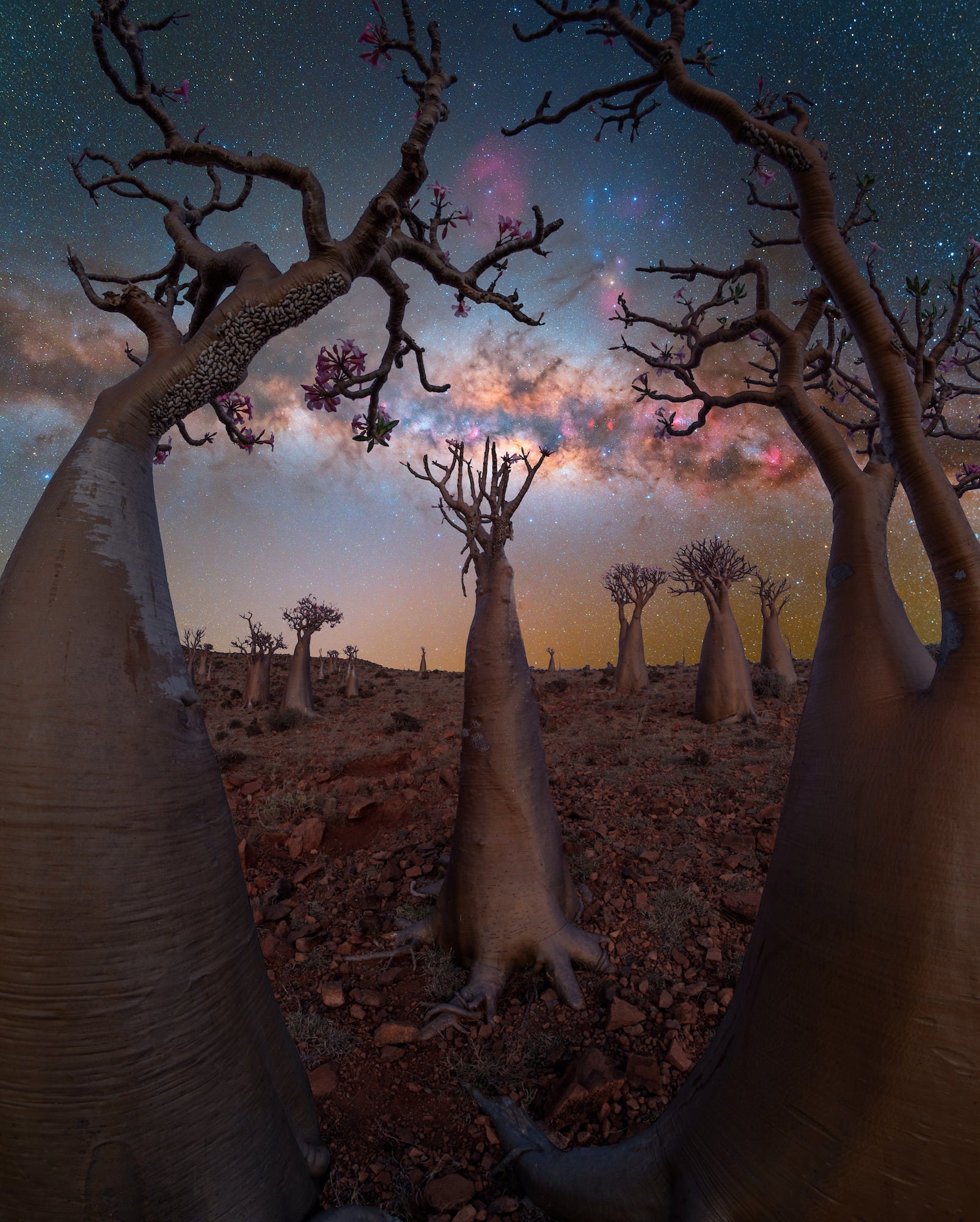
Photo by Benjamin Barakat. Alpha 7 IV. 14mm f/1.8 G Master.
The Mystical Island Of Socotra
I was on the mystical island Socotra which belongs to Yemen and is situated in the Indian Ocean. I’ve been scouting this island for years as it’s one of my favorite places to photograph on planet earth. This location in particular is unknown to most even the locals, and I’ve named it Bottle Tree Paradise. During my yearly tour that I host there to my clients I was scouting for new compositions for my clients to capture when I stumbled upon this one, I knew the Milky Way was rising between the bottle trees so it was a shot that had to be taken!
The Perfect Camera & Lens For Night Photography
For this image I used my favorite camera for night photography the Alpha 7 IV with the 14mm f/1.8 G Master lens. The Alpha 7 IV has a 33 megapixel sensor, making it the perfect amount for shooting in low light photography. Using anything with higher megapixels will result in more noise as opposed to less megapixels which results in less noise but less details. So the Alpha 7 IV is the perfect midpoint for capturing both details and minimizing the amount of camera noise produced in images. Along with the 14mm f/1.8 G Master lens, this is the perfect combo as the fast aperture allows more light in and reduces exposure time. I should note this lens is very sharp edge to edge and produces a beautiful final image.
Stacking Images For The Sharpest Stars
For this image I used a few techniques for producing this final image. It required capturing the foreground and sky separately, stacking images for noise reduction and using a star tracker.
To begin with I captured my foreground in late blue hour moments before darkness and the Milky Way would be in place. My settings were: 10 seconds, f/8, ISO 400, I used a slower aperture to have better sharpness over all and see details that were closer up.
For the sky I then used my star tracker – a tiny device that allows my camera to counter the earth's rotation and get sharp images of the stars. The benefits to this are that I can slow down aperture bringing less vignetting and sharper stars on the corners. It also allows me to shoot at my base iso which is 400 on the Alpha 7 IV minimizing any camera noise.
I also take advantage of the bright monitoring feature on the Alpha 7 IV which is a game changer in night photography. I have a custom button set where with one click the monitor can turn from black to full bright revealing what is in front of me. This is perfect for finding your composition during darkness. Also with the latest update we can use the bright monitoring feature to also focus manually during the night. These two features make my work flow extremely smooth and fun to work with. My gear has to be steady and strong to avoid camera shake but I also like to travel light. That’s why I’m using the Sunwayfoto T2840 CK tripod paired with the EB-36 Ballhead.
How To Edit Your Milky Way Photograph
For post-processing I work in Adobe Lightroom & Photoshop, I also use Starry Sky Stacker for stacking images to reduce noise in my images.
I begin by color balancing my images in Lightroom, removing profile corrections as it’s key to do these adjustments manually in night photography such as removing any vignetting or distortion. Luckily the Sony 14mm f/1.8 produces close to none distortion in my images. After these minor adjustments I then export the images of the sky in TIFF format for stacking in Starry Sky Stacker.
Once this is done I save the file and continue to edit in Photoshop. I apply a few curve adjustments to boost the Milky Way and play with the Color balance tools to achieve the Color and result I want. I also use the contrast function to apply more contrast to the final sky image. Once this is complete I save the file. I then work on my foreground image with the same base procedures in Lightroom but also lifting the shadows and exposure if needed.
The great thing about the Alpha 7 IV is it’s one of the best, if not the best ISO Invariant cameras out there. In short terms what this means is I can underexpose my image out in the field and when post-processing I can increase the exposure by a few points with zero impact on image quality. Once the image is ready I open it in Photoshop and use the sky replacement tool feature to drop in the sky image I had already pre-processed. After a few adjustments to make the blend seamless and color of both foreground and sky match, my image is then complete.
For the perfect camera in low light situations, purchase the Alpha 7 IV.
For a wide-angle G Master that can see in the dark, purchase the 14mm f/1.8 G Master.
See more of Benjamin Barakat’s work on Instagram @benjaminbarakat and at benjaminbarakat.com.