Concert photographer Dimitry Mak aims to capture all the energy of a live concert in his images, and he’s found a shortcut on his Alpha camera to ensure the right subjects are always in focus: Face Registration. By looking up the band’s faces online ahead of time and registering them on his Alpha 7R V (Buy Now), Face Registration prioritizes them as he’s photographing the show. Keep reading to see how by using this feature on his Alpha 7R V paired with the 50-150mm f/2 G Master (Buy Now), he was able to keep even the hardest-rocking, head-banging subjects in focus during a concert featuring rock band The Warning at Palladium Times Square.
Why Use Face Registration?
“As a concert photographer, I love the Face Registration feature on the Alpha 7R V because concert photography is one of the most unpredictable environments you can work in,” Mak says. “The lighting changes every second, the movements are chaotic, and crowd surfers are literally landing in the photo pit. There's already so much to stay aware of, so I need my camera to handle the technical side at a high level while I stay focused on timing and composition.”

The Warning. Photo by Dimitry Mak. Alpha 7R V. 50-150mm f/2 G Master.
Taking Autofocus To The Next Level
Mak raves about the Alpha 7R V's powerful autofocus, and he says the use of Face Registration pushes it even further. “On stage, a roadie or guitar tech might suddenly walk into the frame, or the singer might step in front of the drummer, causing the focus to shift. With Face Registration, I know the camera will prioritize the faces I’ve registered. I can load in the band ahead of time so the camera is already dialed in before I even get to the venue. That kind of reliability makes a huge difference when every moment counts.”

The Warning. Photo by Dimitry Mak. Alpha 7R V. 50-150mm f/2 G Master.
How To Use Face Registration
While Mak’s specific use of Face Registration is for concert photography, it can be used in a wide variety of scenarios. “This feature isn’t just for concert photographers,” he says. “If you're shooting weddings, you can register the bride and groom so the focus doesn’t accidentally lock onto a bridesmaid or someone’s uncle. Your key subjects stay prioritized, even in the most unpredictable scenes.”
To set up a new Face Registration on your Alpha 7R V, follow these steps:
1. MENU → (Camera Settings1) → [Face Registration] → [New Registration].
2. Align the guide frame with the face to be registered, and press the shutter button.
3. When a confirmation message appears, select [Enter].
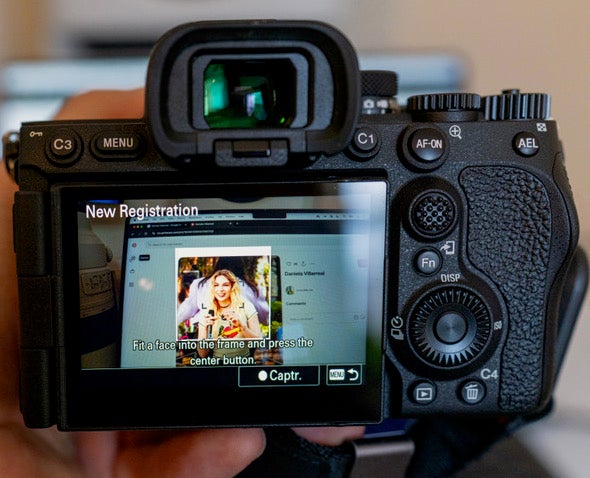
Concert photographer Dimitry Mak sets up Face Registration before the show using online images of members of rock band The Warning
See more of Dimitry Mak’s work on Instagram @dimitrymakphoto.
To keep focus locked on your subjects for high-quality, professional imagery – purchase the Alpha 7R V.
For resolution that rivals prime lenses, purchase the 50-150mm f/2 G Master.